The IPFINITY CloudVoice Wallboard shows real-time call status and in-depth call summaries for each agent. The Administrator is able to monitor which agent is live on which queue/s.
The Administrator will be provided with the URL for their personal wallboard along with the credentials to log in. Below is a sample image of the interface.
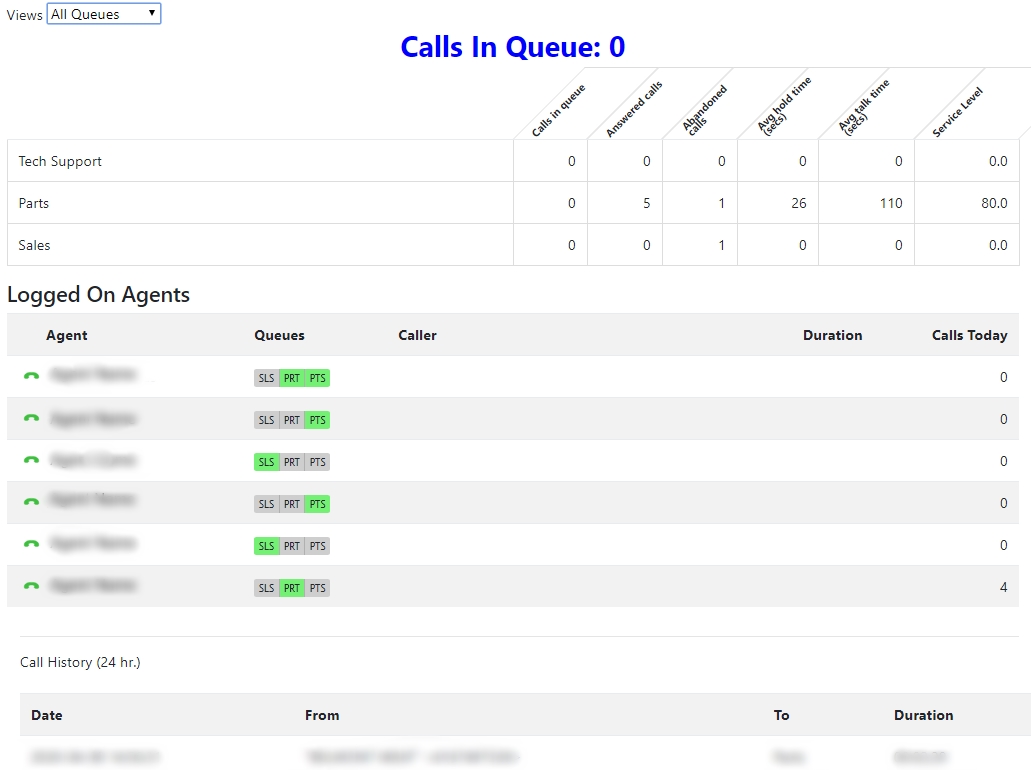
Functionalities:
Live Calls in Queue
- Number of Calls in order
- Waiting time for each caller
The call count status will appear individually for each queue in the following order:
- Calls in queue
- Calls answered
- Abandoned calls
- Average hold time
- Service level
Logged on Agents section shows the following:
- Agent Name
- Queues they’re logged into
- Caller Number (if on call)
- Call Duration
The bottom section shows the Inbound call details sorted by:
- Date and time
- Number of the caller
- Name of incoming call Queue
- Call duration
0 Comments